Wednesday, March 12, 2014

aspspi - USBasp SPI terminal

In the past couple months I've one of the things I've been working on is controlling nrf24l01 modules.  Communication with the modules is via SPI, and debugging was somewhat tedious as it involved modifying code on the AVR, downloading the code, and observing the results output via serial UART.

While writing the picoboot module for avrdude, I noticed avrdude has a terminal mode which allows for commands to be sent to an AVR.  The serial programming interface for AVR MCUs uses SPI, similar to the nrf modules.  I realized instead of an AVR, the programmer could be attached to any device that communicates via SPI.  A couple hours later I had finished writing aspspi for avrdude - which permits a USBasp to be used for interactive SPI communication.

Avrdude requires an avr part (-p), which is not applicable to aspspi, so just use any part listed in avrdude.conf.  The -F argument is to ignore signature checking (since there isn't an avr attached), -u turns off safe mode, and -t enters terminal mode.

In the screen shot above "send 3 0 0 0" sends the command to read register 3 on the nrf.  The response is the status (0e) and the contents of register 3 (03) repeated 3 times.  Sending 0x23 is the command to write to register 3.  As a single-byte register the first 2 zeros are ignored, and the last byte (1) is what gets written to the nrf.

With aspspi I was able to interactively test nrf modules, and I even found an undocumented register 0x1e, which contains at least 3 bytes: 68 66 05.

The code for aspspi is in the picoboot-avrdude repository.

Wednesday, February 26, 2014

Picoboot beta1 release

Today I've released the beta-1 version of picoboot.  Requiring only 66 bytes of flash, picoboot is the smallest AVR bootloader, taking a quarter of the space required by other "tiny" bootloaders which start at around 512 bytes.  Not only is it the smallest available bootloader, it is the smallest possible bootloader for AVRs with a 64-byte page size.  Picoboot is also fast, taking less than 3 seconds to write 8126 bytes to flash.

Future plans include builds for the ATtiny2313a and support for zero-wire auto-reset.

$ avrdude -c picoboot -p t85 -P com16
drain><drain

avrdude.exe: AVR device initialized and ready to accept instructions

Reading | ################################################## | 100% 0.00s

avrdude.exe: Device signature = 0x1e2a00
avrdude.exe: programmer operation not supported

avrdude.exe done.  Thank you.

Monday, February 17, 2014

Breadboard programming cable for ATtiny85, ATtiny88, ATmega328, ATtiny2313, and other AVR MCUs

For programming AVR MCUs, I use a USBasp.  Initially, I would connect the USBasp header pins to header pins on the breadboard with individual jumper wires, then jumper the appropriate pins on the MCU.  Then I noticed a repeating pattern in the pinout of many AVRs.  Here's an example:
Notice the pattern?  MOSI, MISO, SCK, & VCC are all in the same order.  Then I found this page with instructions on building a programming cable for an Arduino mini.  I decided to build a simpler programming cable that would work on a number of AVR MCUs and Pro Minis with a minimum of jumper wires.  Here's the pin arrangement I decided on:

  • GND
  • RST
  • VCC
  • SCK
  • MISO
  • MOSI
The connector works on the ATtiny85 and ATtiny2313 with 2 jumpers (GND & RST).  It needs 3 on the pro mini (GND, RST, & VCC), and with the ATtiny88 and ATmega328, just 2 jumpers are needed - RST and one connecting AVCC to VCC.
Here's the finished result, and the 10-pin ribbon cable with a wire I used to key the connector so I won't plug it in the wrong way.

Thursday, February 6, 2014

Zero-wire serial auto-reset for Arduino

Various versions of the Arduino will reset the board by toggling the serial DTR line, a feature called auto-reset.  Since it relies on the DTR line, it won't work with TTL serial adapters that don't break out the DTR line.  After writing my half-duplex serial UART, I thought of using the TTL serial break signal which holds the line at 0V for several ms.  Normal serial communications would also send 0V, but at 57.6kbps, it would never last more than 160us before returning to the idle high voltage state.  So what I needed was a circuit would not reset when the line is low for 160us, but would reset when the line is low for 100ms or more.

This can be done with a simple Resistor-Capacitor or RC circuit.  The time for a capacitor to discharge by 63% is equal to the resistance in ohms times the capacitance in farads.  Picking a common 0.1uF capacitor and a 10kOhm resistor gives an RC time constant of 1ms, high enough above the 160us time to provide a good safety margin.  Another reason for picking those values is that most pro mini boards, including the Baite Pro mini I recently purchased, use those values for the DTR auto-reset feature.  My plan was to make use of the existing components for my auto-reset circuit.  I also needed a way to quickly charge the capacitor, since the idle time between bytes won't be long enough to fully charge the capacitor through the resistor.  A diode serves that purpose, so the whole circuit takes just 3 parts.
The pro mini already has a 0.1uF capacitor in series between the DTR and RST line, so I shorted DTR to GND to make the connection between the capacitor and ground.  I used tweezers to move the tiny chip resistor (actually 11kOhm on the Baite board) from near the button to the space between the RXD and RST pins:

To finish off the circuit, I trimmed the leads on a diode and soldered it between the RXD and RST pins.  I chose to solder it to the reset on the left side of the board to avoid messing up the chip resistor I soldered on the right side.

To test it, I connected the pro mini to a TTL serial adapter, set up putty to open a serial connection, then pressed Ctrl-Break to send a break sequence.  I then saw the quick flashes from optiboot, indicating the board reset.  I also tested serial communications with a small program that echos characters typed, to make sure it wouldn't reset with normal communications.  The ASCII code for '@' is 0x40, so it has 7 zero bits and makes a good test character.  There was no resets while sending regular characters - so far so good.

Having completed the hardware, the final part was the software.  I looked at Avrdude and found that the auto-reset feature is in the arduino_open function of arduino.c.  I generally do PC software development under Linux, so to learn something different I decided to modify the windows version of avrdude to support my break auto-reset.  A quick google search revealed how to send a break sequence, so I modified ser_set_dtr_rts() in ser_win32.c to send a break signal in addition to toggling DTR and RTS:

        if (is_on) {
                EscapeCommFunction(hComPort, SETDTR);
                EscapeCommFunction(hComPort, SETRTS);
                EscapeCommFunction(hComPort, CLRBREAK);
        } else {
                EscapeCommFunction(hComPort, CLRDTR);
                EscapeCommFunction(hComPort, CLRRTS);
                EscapeCommFunction(hComPort, SETBREAK);
        }

Modifying the code was the easy part; building it was going to take more work.  I found a page explaining how to build avrdude with MinGW, and tried to follow the directions.  The current version of libusb-win32 is slightly different.  Instead of usb.h the include file is named lusb0_usb.h.  I was building on a Window7 64-bit machine so I copied bin\ia64\libusb0.sys instead of libusb0_x86.dll to C:\MinGW\bin.  I also had to setup fstab as described here, by copying fstab.sample to fstab.  I thought I'd be ready to build, but when I ran configure I ran into the gcc.exe No Disk bug:

The machine has an internal USB flash memory reader, so rather than open up the computer and unplug it, I disabled "USB mass storage device" in the device manager.

Configure then ran without errors, and gave the following output:
Configuration summary:
----------------------
DON'T HAVE libelf
DO HAVE    libusb
DON'T HAVE libusb_1_0
DON'T HAVE libftdi1
DON'T HAVE libftdi
DO HAVE    libhid
DON'T HAVE pthread
DISABLED   doc
ENABLED    parport
DISABLED   linuxgpio

After compiling, I had a working avrdude.exe that supported my zero-wire auto-reset feature:
$ ./avrdude -c arduino -P com15 -p m328p -U flash:r:m328.bin:r

avrdude.exe: AVR device initialized and ready to accept instructions

Reading | ################################################## | 100% 0.01s

avrdude.exe: Device signature = 0x1e950f
avrdude.exe: reading flash memory:

Reading | ################################################## | 100% 4.00s

avrdude.exe: writing output file "m328.bin"

avrdude.exe: safemode: Fuses OK (H:00, E:00, L:00)

avrdude.exe done.  Thank you.

The patch for ser_win32.c and the avrdude.exe are here.  I've submitted the patch to Joerg Wunsch so it can be included in the next release of avrdude.
Edit: Jeorg Wunsch seems to be a patch nazi, so it probably won't get added to the official avrdude while he's in control.

Update:

I ran into a problem when using PD0 for a GPIO.  When the pin goes low for several ms, it resets the AVR like a break.  So writing a 0 to PD0 resets the AVR, causing it to reboot.  I removed the 10k resistor and instead plug a 10k resistor between Rx and Rst when I want to flash the AVR, and remove it after I'm done.

Wednesday, January 22, 2014

Baite Pro Mini review

I recently purchased a Baite Pro Mini board on Aliexpress.
Three weeks after ordering, it arrived by registered mail, exactly as depicted.  This one is different from the other Pro Mini boards I've seen in a couple ways.  First is that it uses a QFN (quad flat no-lead) package ATmega328P instead of the slightly larger and more common QFP (quad flat pack).  The other difference is that it uses a crystal oscillator instead of a smaller resonator.  Crystal oscillators are more accurate, which is useful if you need accurate time keeping.  The board came with no documentation, so I assumed it would work like a standard Arduino Pro Mini.

After opening the package I just soldered on the 90 degree header for the serial connections, then connected it into a PL2303HX USB-TTL adapter.  The red power LED came on, and the blue LED started flashing - indicating the pre-loaded blink sketch was running.  The blue LED is quite bright, even though it uses a 750 Ohm current-limiting resistor.  I selected Pro Mini 5v @ 16Mhz from the Arduino IDE, pressed reset, and tried uploading a test sketch.  Avrdude timed out, so I tried again.  There was only one quick blink of the LED - indicating a short timeout for the bootloader.  In case the board was using optiboot @ 115,200kbps, I changed the upload speed in the boards.txt file, and tried a few more times but still no luck.

I decided to flash a new bootloader so I'd have a known configuration.  I chose the Uno from the boards menu because it's configuration uses the optiboot bootloader @ 115,200kbps.  I connected my USBasp, selected USBasp from the programmer menu, then selected "burn bootloader".
After 10-15 seconds it was finished.  I loaded my test sketch, clicked the upload button, pressed reset on the Pro Mini after the "Running AVRDUDE..." message appeared, and the "Done uploading" message quickly appeared.  My sketch was loaded and running.  Considering the $3.65 I paid for it, I think the Baite Pro Mini is a good buy.

2014/09/22 update:

The Pro Mini boards are now selling for $2.50 or less on Aliexpress, so I picked up another one.  This time I checked the fuse settings with avrdude:
avrdude.exe: safemode: Fuses OK (E:05, H:DA, L:FF)

The bootsz fuse is 01, which is 2Kbyte (1Kword), which confirms they do not come with optiboot flashed (which is only 512 bytes).

Saturday, January 11, 2014

AVR half-duplex software UART supporting single pin operation

Many of the ATtiny MCUs have no hardware UART limited number of pins.  Arduino tiny cores uses the TinyDebugSerial class which is output only, so using serial input requires extra code.  I have written a small software serial UART which can share a single pin for Rx & Tx when a simple external circuit is used.

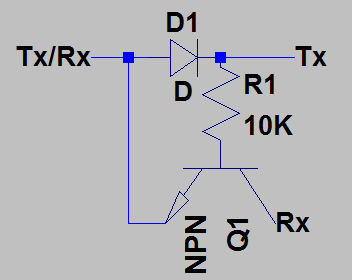
To understand the circuit, a tutorial on TTL serial communication may help.  When the TTL serial adapter is not transmitting, the voltage from the Tx pin keeps Q1 turned on, and the AVR pin (Tx/Rx) will sense a high voltage, indicating idle state.  When the AVR transmits a 0, with Q1 on, Rx will get pulled low indicating a 0.  R1 ensures current flow through the base of Q1 is kept below 1mA.  When the AVR transmits a 1, Rx will no longer be pulled low, and Rx will return to high state.  When the serial adapter is transmitting a 0, D1 will allow it to pull the AVR pin low.  With no base current, Q1 will be turned off, and the Rx line on the serial adapter will be disconnected from the transmission.

I've written the serial code to work as an Arduino library.  Compiled it uses just 62 bytes of flash, and does not require any RAM (there is no buffering).  As it is written in AVR assembly, it will support very high baud rates - up to 460.8kbps at 16Mhz.  The default baud rate of 115.2kbps is defined in BasicSerial3.h, and can be changed with the BAUD_RATE define.  The library defaults to use PB5 for both Tx and Rx.  It can be changed with the UART_Tx and UART_Rx defines in BasicSerial3.S.  Here's an example sketch to that uses it:
#include <BasicSerial3.h>

// sketch to test Serial

void setup()
{
}

void serOut(const char* str)
{
   while (*str) TxByte (*str++);
}

void loop(){
  byte c;
  serOut("Serial echo test\n\r");
  while ( c = RxByte() ){
    TxByte(c);
  }
  delay(1000);
}

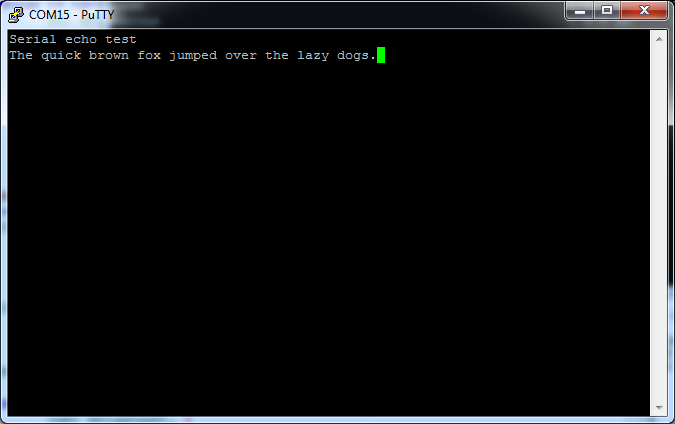
Here's a screen shot of putty running the example:

2020 Update

Over the past several years I've written many updated and improved bit-bang UARTs.  Instead of the BasicSerial code in this post, I recommend using picoUART.  It supports a wider range of baud rates, and the bit timing is accurate to the cycle.

Thursday, January 9, 2014

nrf24l01+ control with 3 ATtiny85 pins

Nrf24l01+ modules are a cheap and low-power option for MCU wireless communication.  Libraries are available for Arduino, and for arduino compatible MCUs like the ATTiny85.  Controlling the nrf modules usually requires power plus 5 pins - CE, CSN, SCK, MOSI, & MISO.  With pin-limited MCUs like the ATtiny85, 5 pins is a lot to tie up.  On something like the Digispark, with PB3 and PB4 hard-wired to USB+ and USB-, using the nrf24l01+ modules might seem impossible.  Another issue is that although the nrf inputs are 5v tolerant, Vcc must be between 1.9 and 3.6V.  I've designed a simple solution to provide 3V power as well as control the modules with just 3 of the pins on the ATtiny85.

For powering the nrf24l01+ module, a 3.3v regulator could be used, but a cheaper and simpler way is to drop a 5V supply to 3V using a 20mA-rated red led.  Most red LEDs have a forward voltage drop between 1.8 and 2.2V, leaving 3.2-2.8V for the nrf, which is well within the 1.9-3.6V requirement.

Controlling CE without using a pin on the AVR is also easy: just tie it high.  In my setup function, I set Mirf.cePin = 7 as a dummy since the tiny85 only has pins 0-6.  I later commented out the digitalWrite calls in Nrf24l::ceHi() and ceLow(), and removed the Mirf.cePin line from setup() which cut down on the size of my compiled sketch.

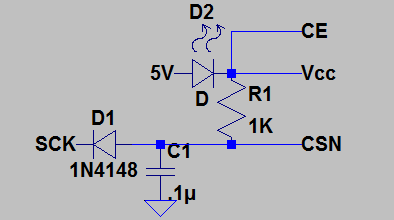
I initially thought the CSN line could be tied low, but when I tried it my test sketch was not getting a valid status back from the nrf module.  I also found section 8.3.1 of the datasheet: "Every new command must be started by a high to low transition on CSN."  So in order to control the nrf with just 3 pins, CSN needs to be multiplexed with one (or more) of SCK, MOSI, or MISO.  After a few different ideas, I came up with this circuit:
When SCK on the ATtiny85 goes high for several microseconds, C1 will charge through R1 and bring CSN high.  If SCK is brought low for several microseconds before being used to clock the SPI data, C1 will discharge through D1 and bring CSN low.  High pulses on SCK of less than a few microseconds during communication with the nrf won't last long enough to charge C1, so CSN will stay low.

To support the multiplexed SCK/CSN, I modified Mirf.cpp as follows:
void Nrf24l::csnHi(){
PORTB |= (1<<PINB2); // SCK->CSN HIGH
delayMicroseconds(64);  // allow csn to settle
}

void Nrf24l::csnLow(){
PORTB &= ~(1<<PINB2);  // SCK->CSN LOW
delayMicroseconds(8);  // allow csn to settle
}

The circuit still worked with a 32us delay in csnHi and 8us in csnLow, but I doubled those values to have a good safety margin.  The delays could be reduced with a smaller capacitor for C1.  Going lower than .01uF could risk CSN going high during the high clock pulses of SCK.

When connecting the nrf module to a tiny85, connect MISO(pin7) on the module to MOSI/DI(PB0), and not MISO/DO(PB1).  Here's the connections required:
nrf module  ATtiny85 pin
SCK(5)      PB2 (physical pin 7)
MOSI(6)     PB1 (physical pin 6)
MISO(7)     PB0 (physical pin 5)

I also changed TinyDebugSerial.h to define TINY_DEBUG_SERIAL_BIT 5, and connected pb5 to the Rx line of my ttl serial module.

Finally, here's my test sketch.  When it runs, it reports a status of 'E', which is the reset value of the status register according to the datasheet.  If you connect things wrong it will usually report 0 or FF.
#include <SPI85.h>
#include <Mirf.h>
#include <MirfHardwareSpi85Driver.h>

void setup()
{
  Serial.begin(115200);

  Mirf.spi = &MirfHardwareSpi85;
  Mirf.init();
}

void loop()
{
  uint8_t nrfStatus;
  delay(3000);
  Serial.print("\nMirf status: ");
  nrfStatus = Mirf.getStatus();
  // do back-to-back getStatus to test if CSN goes high
  nrfStatus = Mirf.getStatus();
  Serial.print(nrfStatus, HEX);
}

Update 2014/06/12:
I've noticed that power usage on the nRF modules shoots up if I leave any inputs (CSN, SCK, MOSI) floating.  With my circuit above CSN will never float, but SCK and MOSI should be pulled high or low when not in use, especially for battery-powered devices.

Update 2014/10/04:
I've written another post titled nRF24l01+ reloaded with more details on controlling these modules.

Update 2015/05/23:
I've figured out a way to control nRF modules with just 2 pins using custom bit-banged SPI routines.